Skip to content

New Workday Reports Enhance Grant Visibility and Financial Insights

Six new Workday reports are now available to support grant reporting and financial analysis for research deans, academic and administrative leaders, and department managers. Together, these reports provide leaders in research colleges and schools with a high-level view of sponsored program activity that was not previously available.

Developed by DATAGroup as part of the Awards Improvement and Development Effort (AIDE), these reports reflect strong cross-campus collaboration, with key contributions from finance and data leaders in the Office of Research, Office of Research Information Services (ORIS), and School of Medicine, as well as project support from UWIT. This work advances AIDE’s goal to enhance reporting capabilities for the UW research community.

A More Powerful Way to View Grant Data

Delivered as a suite, these reports provide multiple ways to explore and analyze grant administration data, making it easier to track budgets, expenses, and trends.

What’s New

  • Sponsor Hierarchy for Federal Funding – View summarized financial data at each level of the Federal sponsor hierarchy, which enables meaningful rollups and analysis of funding patterns. Example: Federal Sponsors → Department of Health and Human Services (DHHS) → National Institutes of Health (NIH) → National Cancer Institute.
  • Direct and Indirect Costs by Object Class – Analyze spending by object class or drill down into direct costs to see each category’s contribution to total expenses.
  • Year-Over-Year Comparisons – Compare awarded budgets vs. actuals over time by sponsor type or object class, with flexible date ranges.
  • Awarded Budgets vs. Actuals Summaries – View by PI, award contract owner, or sponsor type.
  • Robust Report Prompts – Use prompts to refine results. For more details, refer to the Workday Report Prompt Glossary.

Report Highlights

Learn more about each report below!

Tip: Need some help with Workday reporting basics before exploring these reports? Check out these resources:

R1211 – Year Over Year Direct and Indirect Expenditures by Sponsor Type

A screenshot of the R1211 report. The "Federal Sponsors" category is highlighted.

A screenshot of the R1211 report. The National Institutes of Health sponsor category is highlighted.

Use this report to:

  • Track year-over-year trends for direct, indirect, and total costs by Federal and non-Federal sponsors.
  • Compare financial allocations across sponsor types.
  • Assess potential impacts of changes to Facilities & Administration (F&A) rates on Federal awards.
  • View how Federal funding is distributed across primary sponsors and their associated agencies.
  • Analyze funding trends by each sponsor within NIH.

Access this report in Workday: Year Over Year Direct and Indirect Expenditures by Sponsor Type R1211.

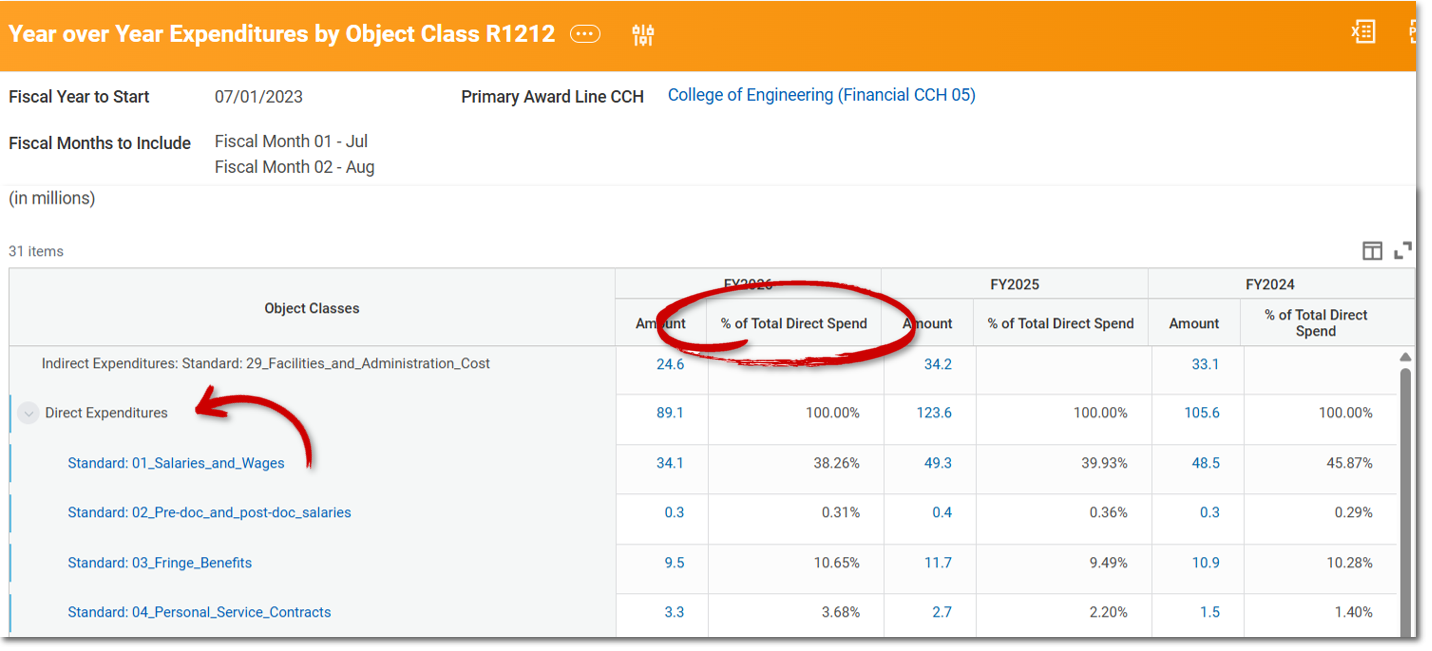
R1212 – Year Over Year Expenditures by Object Class

A screenshot of the R1212 report. The "Direct Expenditures" category is highlighted in the "Object Classes" column.

Use this report to:

  • Compare year-over-year trends of indirect costs to direct costs by object class.
  • Analyze the percentage breakdown of direct costs by object class relative to total costs, across multiple years.

Access this report in Workday: Year Over Year Expenditures by Object Class R1212.

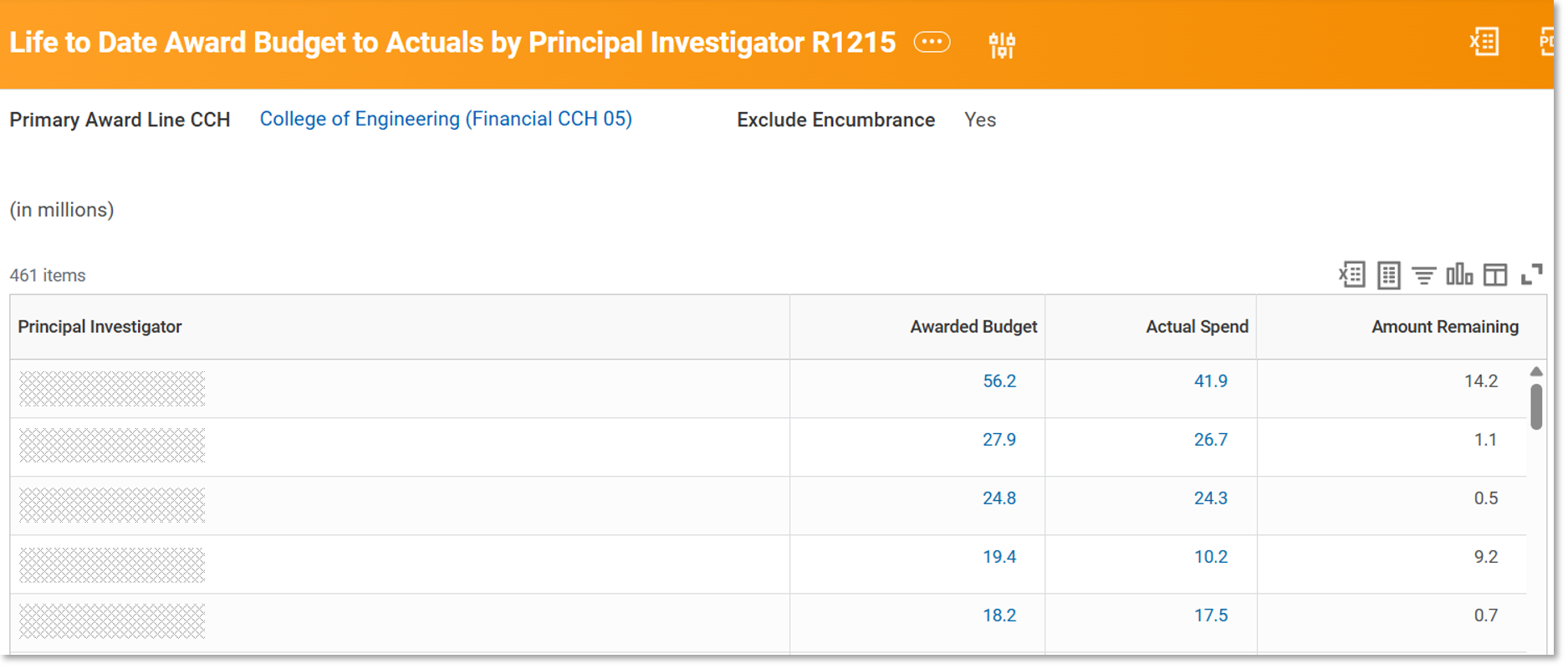
R1215 – Life to Date Award Budget to Actuals by Principal Investigator

A screenshot of the R1215 report.

Use this report to:

  • Review a high-level summary of financial activity by Principal Investigator and their research contributions.
  • Drill down to view details by individual grant.

Access this report in Workday: Life to Date Award Budget to Actuals by Principal Investigator R1215.

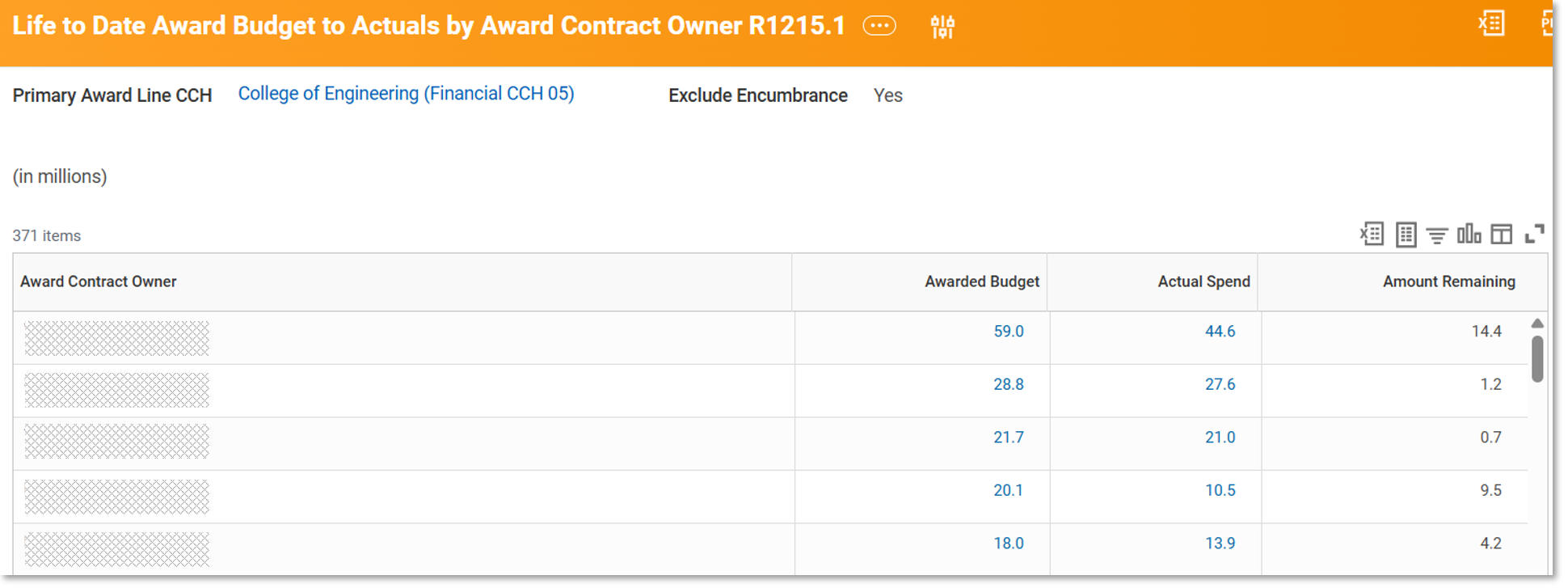
R1215.1 – Life to Date Award Budget to Actuals by Contract Owner

A screenshot of the R1215.1 report.

Use this report to:

  • Review a high-level summary of financial activity by the award contract owner and their individual research contributions.
  • Drill down to view details by individual award or grant.

Access this report in Workday: Life to Date Award Budget to Actuals by Contract Owner R1215.1.

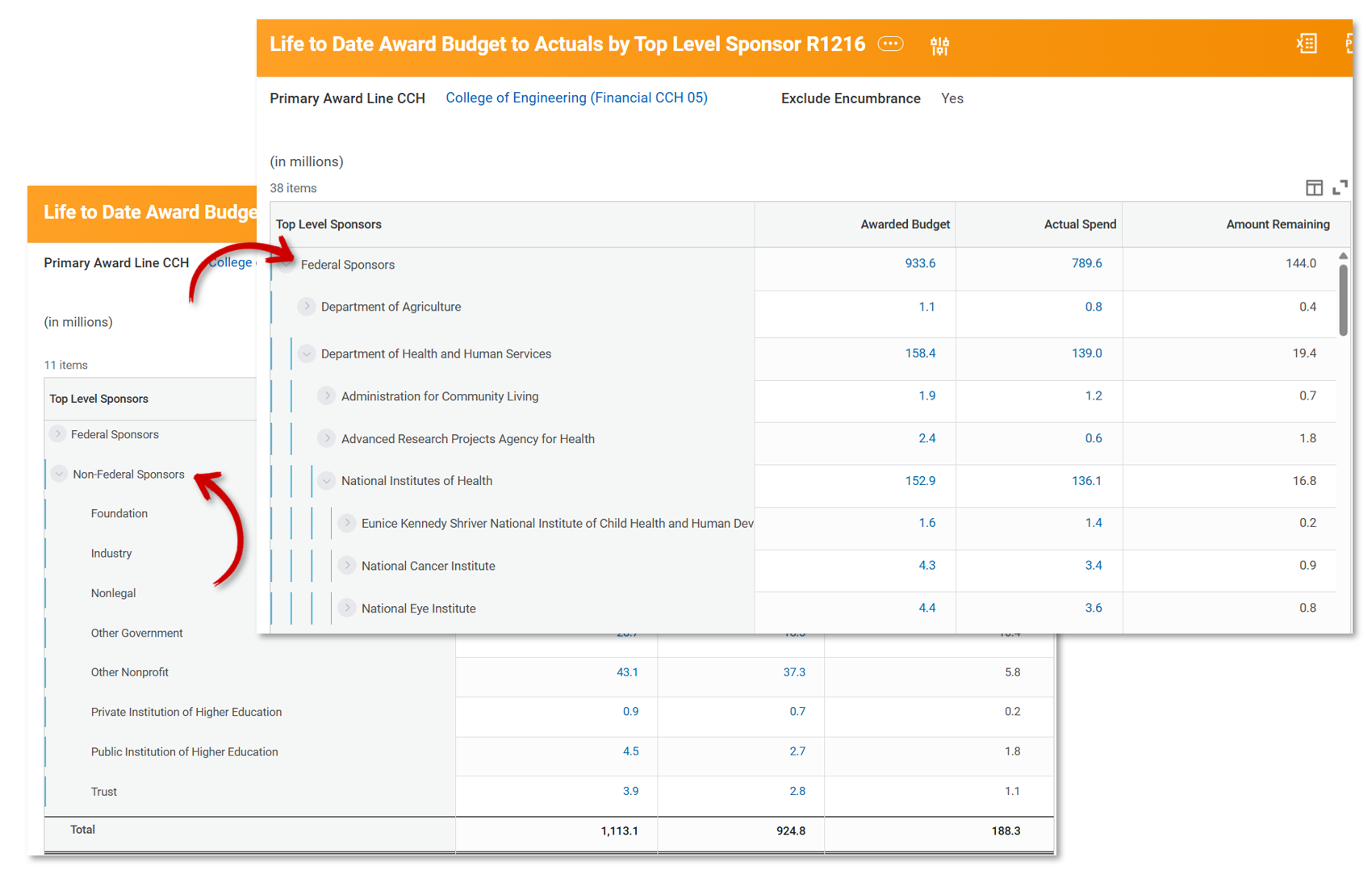
R1216 – Life to Date Award Budget to Actuals by Top Level Sponsor

A screenshot of the R1216 report with two views. In one view, the "Federal Sponsors" category is highlighted. In the other view, the "Non-Federal Sponsors" category is highlighted.

Use this report to:

  • Review a high-level summary of budgets to actuals and remaining balances by Federal and non-Federal sponsors.
  • Track spending to date and current balances for Federal and non-Federal sponsors.
  • Drill down to view financial allocations by Federal Primary Sponsors and their associated agencies (for example, DHHS → NIH → National Cancer Institute).

Access this report in Workday: Life to Date Award Budget to Actuals Top Level Sponsor R1216.

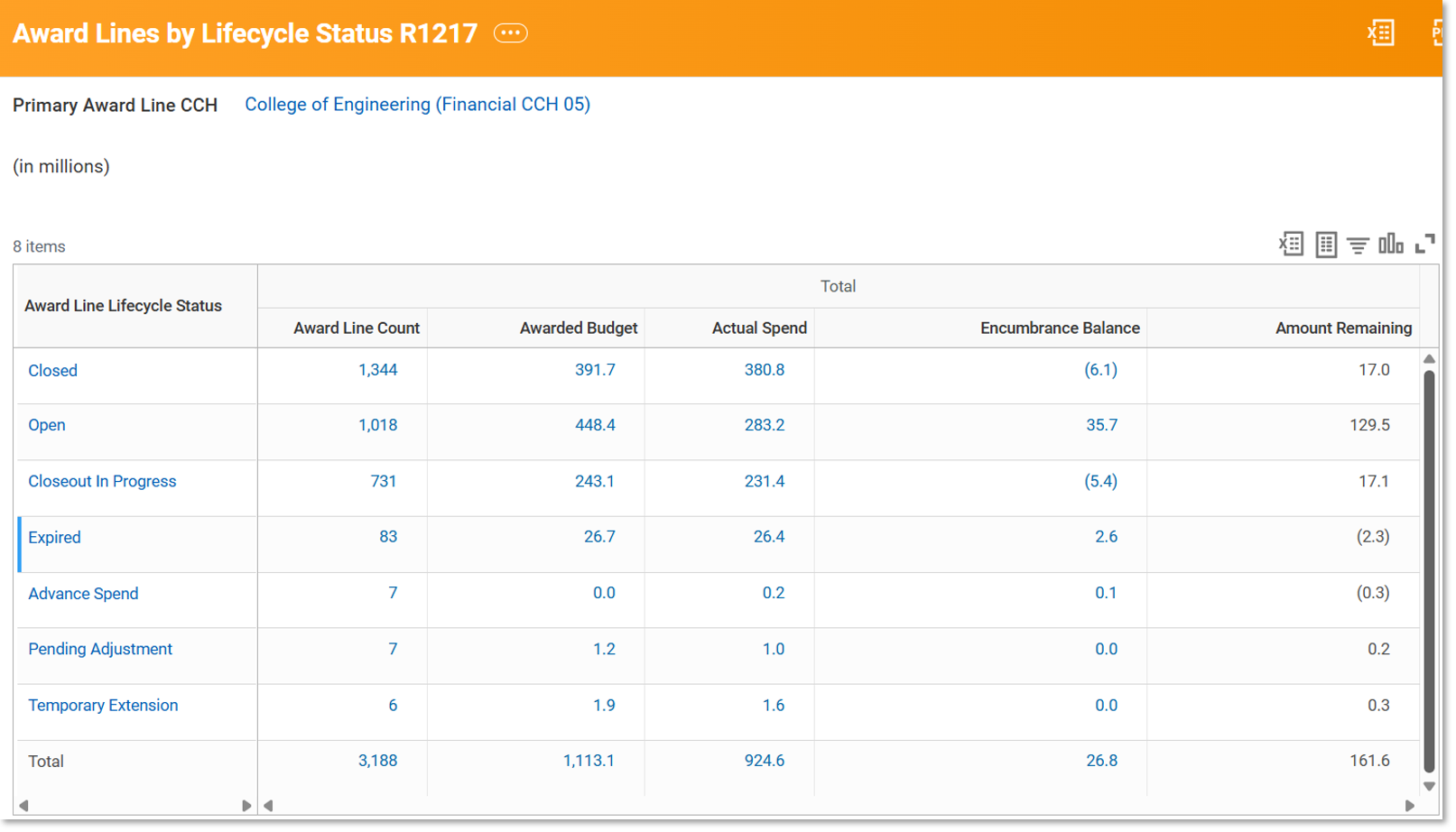
R1217 – Award Lines by Lifecycle Status

A screenshot of the R1217 report.

Use this report to:

  • Review a high-level summary of award-line funding by lifecycle status.
  • Understand where funds are within the award lifecycle to identify potential issues in the administrative process.

Access this report in Workday: Award Lines by Lifecycle Status R1217.

Learn More

You can also learn more about these new reports at two upcoming events:

Monthly Research Administration Meeting (MRAM) – A Subject Matter Expert (SME) will provide a brief overview of the report suite and highlight key features and use cases.

Reporting & Analytics Office Hours – A SME will demo each report and answer questions.


Upcoming EDW Data Updates Related to Procurement Roll Forward (PRF) Journal Cleanup

WHAT: Duplicate Roll Forward Encumbrance journals were inadvertently created and will need to be deleted. 

WHO: Customers extracting EDW data into downstream systems, please note you may need to remove these journals on your end. 

WHEN: Fix will be seen in EDW on 3/17, cleanup can be asynchronous 

Hello EDW Users, 

We want to inform you about upcoming changes to EDW data related to cleanup duplicate Procurement Encumbrance Roll Forward (PRF) journals within Workday. The University Controller’s Office (UCO) and Financial Accounting & Management (FAM) are canceling certain encumbrance journals in Workday to resolve issues where duplicate Roll Forward Encumbrance journals were inadvertently created. 

This update will affect only encumbrance journals, also known as the Obligation Roll Forward journal source in the Encumbrance Ledger. Approximately half of the affected journals are from FY25 and half from FY26. A similar cleanup process was performed at the close of FY24. 

Customers extracting EDW data into downstream systems, please note you may need to remove these journals on your end. This action can be performed independently at any time and does not require coordination with the Workday or EDW updates. 

 What’s Happening in Workday

UCO and FAM are: 

  • Unposting and then canceling a set of duplicate PRF journals. 
  • This cleanup will result in Workday containing some journals as posted even though they are canceled. 
  • This behavior is expected as part of correction effort. 

What This Means for EDW

To ensure that EDW remains consistent and accurate: 

  1. Removal of Impacted Journal Lines 

EDW will: 

  • Delete all journal lines and journal objects for the set of affected journal WIDs provided by UCO/FAM. 
  • All deleted journal lines and objects will be added to the EDW Delete Audit table for downstream traceability. 
  1. Cleanup of Related References

Some posted journals contain Reverses or ReversedBy references pointing to the journals being removed.
EDW will: 

  • Remove invalid references in these columns where the linked journal is deleted. 

This cleanup affects: 

  • ~25,000 Procurement Journals 
  • ~73,000 Journal Lines 
  1. Data Sync Expectations

As a reminder: 

  • EDW may temporarily be asynchronous from Workday during this cleanup. 
  • This behavior is consistent with similar cleanup efforts performed after FY24 closing. 

Timeline

  • 3/9 – Fix executed and published in EDW TEST 
  • 3/12 – Workday production cleanup 
  • 3/16 – EDW will perform the production journal cleanup 
  • 3/17 – Cleaned data published in customer-facing EDW environments 

An example of what will happen: 

  • Journal A: FY25 journal (reversed by B) – not duplicated 
  • Journal B: Roll Forward (reverses A) – duplicate will be deleted 
  • Journal C: Roll Forward – duplicate will be deleted 
  • Journal D: Cancel PO (reverses B) – not duplicated, this is a normal process to clear encumbrance roll forward balance when PO is cancelled 
  • Journal E: Fix task cancel (cancels B) – duplicate will be deleted 

Questions or Support 

If you have questions about the upcoming changes or notice unexpected behaviors in your EDW reports, please reach out to the EDW Team via edw-help@uw.edu. 

Thank you for your patience as we ensure the accuracy and consistency of financial data across our systems. 

Enterprise Data Warehouse (EDW) Team 

EDW Breaking Changes March 11, 2026

EDW Breaking Changes March 11, 2026

Summary of changes, details to follow below.

JIRA Database Table Notes
EDW-25564 UWODS sec.EmploymentStatus Logic change, existing logic avaialble in new table sec.EmploymentStatusWorkerType
EDW-25654 UWODS sec.CustomerRefund Column Removals
EDW-25590 SpaceDataStore sec.BuildingInteriorSpace Data type changes
sec.EmployeeInSeat
sec.FunctionalUse
sec.PIsToRooms
sec.SharedSpace
sec.SpaceWorktag

EmploymentStatus Logic Change – EDW-25564

A new table UWODS.sec.EmploymentStatusWorkerType has been created to replace the existing UWODS.sec.EmploymentStatus. The table currently named UWODS.sec.EmploymentStatus can show multiple statuses for the same person when they have worked under multiple worker types. The new table name better respresents this behavior and avoids confusion.

Table Notes
sec.EmploymentStatusWorkerType New table (already available), replacing existing sec.EmploymentStatus.
sec.EmploymentStatus Existing table, no change to column structure. Going forward will return one record instead of multiple when cases of multiple statuses for the same person.

If you are in need of multiple statuses for the same person – please migrate from UWODS.sec.EmploymentStatus to UWODS.sec.EmploymentStatusWorkerType

CustomerRefund Column Removals – EDW-25654

Table Column Notes
sec.CustomerRefund RefundStatusKey Replace with RefundStatus_DocumentStatusKey
RefundStatusWID Replace with RefundStatus_DocumentStatusWID

SpaceDataStore Data Type Change Details – EDW-25590

Table Column Existing Data Type New Data Type
sec.BuildingInteriorSpace Usable No data type change, currently showing sq ft. Will change back to Yes/No
Assignable
sec.SharedSpace BuildingKey varchar(max) nvarchar(50)
FloorKey varchar(max) nvarchar(50)
SpaceID varchar(max) nvarchar(50)
ShortName varchar(max) nvarchar(25)
AllocationAssignmentKey varchar(max) nvarchar(50)
RoomPercent varchar(max) numeric(10,2)
sec.EmployeeInSeat EmployeeID varchar(max) nvarchar(9)
PrimaryRoom varchar(max) boolean
BuildingKey varchar(max) nvarchar(50)
FloorKey varchar(max) nvarchar(50)
SpaceID varchar(max) nvarchar(50)
ShortName varchar(max) nvarchar(25)
sec.FunctionalUse FunctionalUse varchar(max) nvarchar(6)
RoomPercent varchar(max) numeric(10,2)
AllocationAssignmentKey varchar(max) nvarchar(50)
BuildingKey varchar(max) nvarchar(50)
FloorKey varchar(max) nvarchar(50)
SpaceID varchar(max) nvarchar(50)
ShortName varchar(max) nvarchar(25)
sec.PIsToRooms EmployeeID varchar(max) nvarchar(9)
PIPercent varchar(max) numeric(10,2)
BuildingKey varchar(max) nvarchar(50)
AllocationAssignmentKey varchar(max) nvarchar(50)
FloorKey varchar(max) nvarchar(50)
SpaceID varchar(max) nvarchar(50)
ShortName varchar(max) nvarchar(25)
sec.SpaceWorktag WorktagID varchar(max) nvarchar(10)
WorktagName varchar(max) nvarchar(255)
WorktagPurpose varchar(max) nvarchar(100)
CostCenter varchar(max) nvarchar(10)
EmployeeID varchar(max) nvarchar(9)
AllocationAssignmentKey varchar(max) nvarchar(50)
PrimaryRoom varchar(max) boolean
BuildingKey varchar(max) nvarchar(50)
FloorKey varchar(max) nvarchar(50)
SpaceID varchar(max) nvarchar(50)
ShortName varchar(max) nvarchar(25)

UWSDBDataStore Reorg on January 31, 2026

UWSDBDataStore Reorg on January 31, 2026

The student database (SDB) will go through a reorganization on January 31, 2026 which will cause changes in the Enterprise Data Warehouse database, UWSDBDataStore. These changes to the objects will be available in the UWSDBDataStore on February 2, 2026
However, data on the new objects will be available as soon as the Data Custodians submit the security role definitions and the SIS team loads the data.

Last Updated – 1.29.26

Columns to be Added

Table Column DataType
SF_EVALUATION** STD_ISIR_EMAIL char(50)
STUDENT_1 EO_MODCAMP_ID char(8)
EO_MODCAMP_DT datetime
STUDENT_2_CERTIFICATE_INFO CERTIF_YR smallint
CERTIF_QTR tinyint
CERTIF_BRANCH tinyint
CERTIF_MAJOR_ABBR char(6)
CERTIF_PATHWAY tinyint
CERTIF_LEVEL tinyint
CERTIF_TYPE tinyint

Columns to be Removed

Table Column
SR_DEC_RESULTS SR_DEC_NAME
SR_DEC_DOB
SR_DEC_SSN
SR_DEC_SPARE_1
SR_DEC_SPARE_2
SR_DEC_SPARE_3
SR_DEC_SPARE_4
SR_DEC_SPARE_5
SR_DEC_SPARE_6
SR_DEC_BOOLEAN_1
SR_DEC_BOOLEAN_2
SR_DEC_BOOLEAN_3
SR_DEC_BOOLEAN_4
SR_DEC_BOOLEAN_5
SR_DEC_BOOLEAN_6
SR_DEC_BOOLEAN_7
SR_DEC_BOOLEAN_8

Change to Primary Key

Table New PK Column
SF_FEES SFF_TERM

**Moving from SF_Evaluation to SF_Evaluation1 due to the column addition:
HEAL_LOAN_FLG

Discovering New Academic Possibilities with DawgPath’s Topically Similar Majors Feature

Since 2021, DawgPath has been a key tool for improving a Husky’s academic journey. Now, a new feature—Topically Similar Majors—makes it even easier for UW students to explore programs that share common themes, topics, and subject matter.

Whether a student is facing capacity-constrained major admissions, rethinking their academic interests, or still deciding on a direction, this tool offers a curated list of majors that align with a student’s interests. It’s designed to spark new ideas, highlight alternative pathways, and support informed decision-making.

Advisers across all three UW campuses can also use this feature to guide students toward programs that fit their aspirations. With Topically Similar Majors, DawgPath continues its mission to support every Husky in discovering relevant, rewarding academic options.

Note: The Topically Similar Majors project was sponsored in part by a grant from the Student Tech Fee Committee.

Below is a screenshot that shows majors that are similar to Biology, filtered by admission type.

A screenshot of the DawgPath application that shows majors that are similar to Biology, filtered by admission type.

How does it work?

DawgPath uses advanced language-based semantic modeling to uncover meaningful connections between academic programs by analyzing multiple data sources. The dataset includes comprehensive textual information for each major offered across UW campuses—such as degree titles, credential codes, program and option descriptions, and course details. Each major is represented by a unified document that also incorporates enrollment-restricted courses and the top 50 frequently taken courses by students in that major and option.

Note: Suggested majors are presented as exploratory samples rather than ranked recommendations and should be considered alongside personal goals and guidance from academic advisers.

For more information, refer to DawgPath Overview.

Cross-unit collaboration

This project leveraged expertise across the Data & Applications division of UW-IT, including Data Scientists and Engineers from Reporting and Analytics, Application Engineers and a Service Manager from Student Educational Technology Services, and User Experience Designers from Coordination & Design.

How to access

Anyone with a NetID, including graduates and applicants, can access DawgPath at https://dawgpath.uw.edu/.

Questions

If you have any questions or ideas for similar DawgPath features, please contact help@uw.edu with “DawgPath” in the subject line.

Connecting Campus with Space Data via the Enterprise Data Platform

UW Facilities manages more than 15 million square feet of owned space on the Seattle campus and over 2 million square feet of leased space across the greater Seattle area. These spaces are essential to the University’s academic, research, and administrative operations. To effectively manage them, UW Facilities relies on a Space Management System that supports data-driven decision-making and ensures compliance with federal and state reporting requirements—including the Facilities & Administrative (F&A) rate proposal, which depends on reliable research space data.

When UW Facilities began the project to replace its Space Management System earlier this year, it opened the door for UW-IT to expand how space data is managed and shared across the University. Together, the teams delivered two major outcomes for enterprise data customers: the introduction of space data into the Enterprise Data Warehouse (EDW) and the transition of the existing Space Web Service to the new system as its data source.

About the Solutions

Enterprise Data Warehouse (EDW)

UW Facilities needed a more scalable, dependable, and integrated way to manage and share space data across the UW. Previously, customers accessed this data directly from Facilities’ systems—creating extra work for Facilities staff and limiting the ability to combine space data with other enterprise datasets.

To address this, the project team moved space data into the EDW and established a new database—SpaceDataStore—to house the data in a comprehensive relational structure designed to support a wide range of reporting and analytics needs.

This solution:

  • Standardizes data access and security
  • Ensures reliability and consistent uptime
  • Reduces operational overhead for Facilities
  • Enables integration with other EDW datasets (for example, HR, Finance, Academics, and Core Data)
  • Supports strategic planning, spatial analysis, and indirect cost recovery
  • Provides Space Data customers with a familiar, standard approach to both EDW change management and customer support.
  • Consolidates direct-access customers into the EDW, improving data consistency and simplifying how space data is managed across campus.

Notes:

  • Existing EDW customers have access to most of the new Space Data through their existing EDW data access role. No need to put in a new data access request.
  • Definitions for all the new Space Data remain under development and will be published in Knowledge Navigator soon.

For more information about SpaceDataStore, refer to Announcement: Launch of the New SpaceDataStore Database in EDW.

Enterprise Web Services (EWS)

In parallel, the EWS team transitioned the Space Web Service to use FM:Systems as its new data source. Despite a tight timeline and complex dependencies, the transition was completed seamlessly—with no disruption to customers or downstream systems.

The updated solution:

  • Preserves existing customers’ integrations with no interruptions or changes
  • Ensures stability and continuity for web service customers
  • Reinforces UW’s commitment to dependable, enterprise-scale solutions
  • Continues to protect Space Data customers (such as Workday) from upstream changes

Collaboration Across Teams

This project demonstrates the power of collaboration—both across UW-IT and with campus partners. What began as a system replacement became an opportunity to modernize how space data is connected, managed, and shared across the University. By combining technical and operational expertise, UW-IT and UW Facilities delivered a streamlined, enterprise-level solution that strengthens the foundation for smarter planning and more connected data at the UW.

The effort brought together the following groups, each contributing essential expertise to make the project a success.

Enterprise Data Warehouse Solution:

  • Analysis & Design, UW-IT – Trina Mosher, Daniel Kim, Robert McLaughlin
  • Enterprise Data Warehouse, UW-IT – Dre Tanner, Ian Stewart, Rosalie Leano
  • UW Facilities – Jay Dahlstrom, Corey Chan, LaMonte McGraw

Enterprise Web Services Solution:

  • Analysis & Design, UW-IT – Trina Mosher, Daniel Kim, Robert McLaughlin
  • Enterprise Web Services, UW-IT – Gary Lu, Dominic Ho
  • UW Facilities – Jay Dahlstrom, Corey Chan, LaMonte McGraw

Questions?

Email help@uw.edu and include “EDW” or “EWS” in the subject line.

Announcement: Launch of the New SpaceDataStore Database in EDW

A new database SpaceDataStore is introducing the initial set of Space Data views, which are obtained from FM Systems, the space management system of record. The Space Data Store is a comprehensive relational database designed to support spatial analysis, facilities management, strategic planning and indirect cost recovery. SpaceDataStore contains the following views:

  • BuildingFloor
  • BuildingInteriorSpace
  • EmployeeInSeat
  • FacilityAddress
  • FacilityStatus
  • FacilittyTable
  • FacilityType
  • FunctionalUse
  • PistoRooms
  • ShareSpace
  • Site
  • SpaceClassificationLevel1
  • SpaceClassificationLevel2
  • SpaceWorktag

Definitions for the views and columns will be made accessible in the Knowledge Navigator

Questions?

Please contact edw-help@uw.edu with “SpaceDataStore” in the subject line.


UWSDBDataStore Reorg on October 18, 2025 

UWSDBDataStore Reorg on October 18, 2025 

The student database (SDB) will go through a reorganization on October 18, 2025 which will cause changes in the Enterprise Data Warehouse database, UWSDBDataStore. These changes to the objects will be available in the UWSDBDataStore on October 20, 2025
However, data on the new objects will be available as soon as the Data Custodians submit the security role definitions and the SIS team loads the data.

Last Updated – 10.19.2025

Columns to be Added

Table Column DataType
SA_WD_DET_TRANS WD_DET_BATCH_NO smallint
SA_WD_SUM_TRAN WD_SUM_SYSTEM_KEY int
WD_SUM_BATCH_NO smallint

New Tables

Table Column DataType
SR_DEC_RESULTS SR_DEC_NAME char(45)
SR_DEC_DOB datetime
SR_DEC_SYSKEY int
SR_DEC_SSN int
SR_DEC_SLATE_ID int
SR_DEC_CAMPUS tinyint
SR_DEC_APPL_TYPE char(1)
SR_DEC_APPL_STATUS char(1)
SR_DEC_MESSAGE char(50)
SR_DEC_POSTED_DT datetime
SR_DEC_SPARE_1 int
SR_DEC_SPARE_2 int
SR_DEC_SPARE_3 int
SR_DEC_SPARE_4 char(10)
SR_DEC_SPARE_5 char(10)
SR_DEC_SPARE_6 char(10)
SR_DEC_BOOLEAN_1 bit
SR_DEC_BOOLEAN_2 bit
SR_DEC_BOOLEAN_3 bit
SR_DEC_BOOLEAN_4 bit
SR_DEC_BOOLEAN_5 bit
SR_DEC_BOOLEAN_6 bit
SR_DEC_BOOLEAN_7 bit
SR_DEC_BOOLEAN_8 bit


Table Column DataType
SR_MINI_MASTER_MINOR_PROGRAM MM_YEAR smallint
MM_QTR tinyint
MM_PROC_IND tinyint
MM_STUDENT_NO int
INDEX_1 smallint
MM_MINOR_BRANCH tinyint
MM_MINOR_COLLEGE char(1)
MM_MINOR_ABBR char(6)
MM_MINOR_PATHWAY tinyint
MM_MINOR_CAT_YR smallint
MM_MINOR_CAT_QTR tinyint
MM_MINOR_DT datetime
MM_MINOR_USER_ID char(12)
MM_MINOR_EVENING bit

Columns to be Removed

Table Column Name
SDBDB01 LAST_RUN_NUM

Columns to be Renamed

Table Column Name New Column Name
STUDENT_1 S1_BOOLEAN_08 NO_MAC_NAME_CAPS
S1_BOOLEAN_09 PEND_RESIDENCY_ST

Table to be Renamed

Table Name New Table Name
SR_ADV_SYS_SET SR_ADVISER_NOTES


Advancing Accessibility: A New Dashboard for Tracking Progress

The ADA Digital Accessibility Initiative (DAI) ensures that UW’s digital content is accessible, providing equal information, interactions, and services to people with disabilities. Additionally, the Initiative is leading UW’s work to comply with Department of Justice regulations by April 2026 and setting up the mechanisms to ensure accessible content thereafter.

To support this Initiative, the ADA Digital Accessibility Compliance Progress dashboard is now available to track implementation and monitor digital accessibility compliance by:

  • Improving leadership access to clear, relevant digital accessibility data.
  • Highlighting areas with challenges that may increase risk.
  • Providing a consistent but flexible source of progress data to support data-driven decision-making for training, resources, and other institution-wide support.

This dashboard highlights key metrics such as accessibility scores, common website accessibility issues, opportunities for improvement in video captioning, and overall compliance with accessibility standards over time.

Collaborating to Meet Requirements

Creating this dashboard was a team effort! Staff from the Civil Rights Compliance Office and UW-IT’s Accessible Technology Services team defined the requirements and provided feedback, while UW-IT’s Web Applications and Business Intelligence (BI) teams built the data pipeline, developed the dashboard, and refined it through testing.

About the Data

This dashboard reflects data from the following sources:

  • DubBot – An automated website accessibility checker that runs more than 100 checks on web pages and provides feedback to site owners. It also flags broken links, spelling errors, compliance issues with governance policies, and search engine optimization (SEO) best practices. For more information, refer to DubBot Web Accessibility Checker.
  • UW YouTube Caption Reports – These reports help YouTube channel owners monitor and improve the accessibility of their videos. They are generated by the YouTube Caption Auditor (YTCA), which is an open-source tool developed by UW-IT’s Accessible Technology Services. For additional information about how to caption videos, refer to the Captions.

About the Dashboard

The ADA Digital Accessibility Compliance Progress dashboard answers key questions with the following four visualizations.

Website Compliance Progress

This visualization shows digital accessibility score trends for the selected Unit, compared to the baseline of UW Core Sites within the chosen date range.

Accessibility scores are generated by DubBot, which monitors websites for specified accessibility issues, including Web Content Accessibility Guidelines (WCAG) criteria. Score changes reflect progress, but a high score does not guarantee full compliance.

An example screenshot of the Website Compliance Progress visualization.

Website Accessibility Scores

This table displays digital accessibility scores for UW websites filtered by the selected Unit and sorted by score. This helps identify sites that may need remediation support.

This section also displays the total number of sites for the selected unit. Use the Number of Rows dropdown to choose how many sites to display. By default, the table shows 5 sites.

An example screenshot of the Website Accessibility Scores visualization.

Website Accessibility Issues

This bar chart displays common web content accessibility issues, filtered by the selected Unit and sorted by number of occurrences. It helps users to prioritize fixes with the greatest impact for their Unit.

Use the WCAG Level filter to view issues by WCAG 2.1 conformance level (A, AA, AAA). By default, A and AA issues are shown, as these must be addressed for ADA compliance.

An example screenshot of the Website Accessibility Issues visualization.

Video Captions by YouTube Channel(s) and Scan Date

This trend line shows the percentage of captioned videos over time for the selected channel, compared to the average for all UW YouTube videos. Because captions are required for ADA compliance, it helps identify channels with videos that need captioning.

Use the Channel Name and Scan Date Range filters to explore captioning performance for specific content owners, teams, or time periods.

An example screenshot of the Video Captions by YouTube Channel(s) and Scan Date visualization.

Access Information

The Civil Rights Compliance Office manages access to this dashboard via a UW Group.

To request access, email ada504@uw.edu and include “Access Request: ADA Digital Accessibility Compliance Progress” in the subject line.

Questions?

If you have questions about this dashboard or would like to inquire about a similar solution for your department, please contact help@uw.edu with “BI Portal Dashboards” in the subject line.

Preserving Access: BI Team Supports Retirement of Legacy Finance Systems

In FY 2024, the University of Washington officially transitioned to Workday Finance as its primary financial system of record. To minimize disruption during the rollout, several systems slated for retirement were temporarily placed in read-only mode, allowing users to retain access to legacy financial data.

As users adjusted to the new Workday environment, UW-IT launched a major project to fully retire these read-only systems. The Business Intelligence (BI) team played a key role—developing reporting solutions to ensure continued access to legacy financial data after system retirement.

BI Team Contributions: Technical Solutions and Strategic Support

The BI team contributed to the technical development of reports and helped users transition to new solutions, ensuring uninterrupted access to legacy financial data.

Key contributions included:

  • Collaborating with business/technical owners and end users to understand requirements.
  • Developing and maintaining reports and data cubes to access legacy data.
  • Creating templates and tools to preserve key functionality.
  • Supporting communication and change management efforts to guide users to the right tools and resources.

The following table summarizes the new and existing BI resources for each retired system:

Retired Finance System BI Resources for Access to Legacy Data
Ariba
BGT
Electronic Faculty Effort Certification System (eFECS)
Financial Accounting System (FAS)/FIN
JD Edwards
My Financial Desktop (MyFD)
OASIS
Purchasing Accounting System (PAS)

To explore the full crosswalk of retired systems and their corresponding BI reports, refer to the Legacy Finance Data page. This central resource outlines what was retired, what replaced it, and how to continue accessing legacy financial data.

Questions?

Email the BI team at help@uw.edu and include “BI Portal” in the subject line.