Purple gives UW faculty, staff, and students access to AI models for research, analysis, writing, coding, and document work. Each user has a monthly budget that resets on the first of every month. How quickly you use it depends on the model you choose and the work you ask Purple to do. Routine requests may use relatively few resources, while large-document analysis, advanced models, and multi-step agents may use more.
Monitor Your Monthly Budget
The small donut chart in the upper-right corner of Purple shows the percentage of your monthly budget you have used.
Select the chart to see when your budget was last reset and how many days remain until the next reset.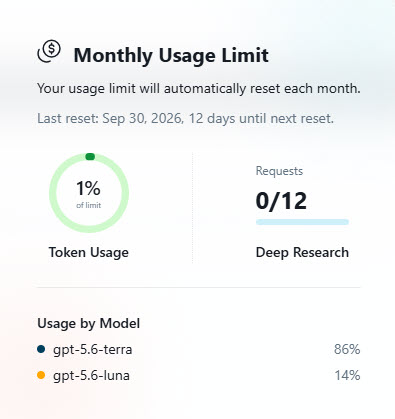
Note: If you reach 100% of your budget, you can still view your chats. You cannot start or continue conversations until your budget resets.
Make Your Budget Work Harder
Models vary in capability, speed, resource use, and cost. For routine tasks, such as quick questions, drafts, outlines, summaries, brainstorming, and simple coding, start with a cost-efficient model. When you need help with hard problems, complex code, research, long or high-stakes documents, or advanced agent work, a more capable model may be the better choice.
Green leaf icons in Purple identify models designed to use fewer resources. Start with a model that has more green leaves when it can meet your needs, then move to a more resource-intensive model when the task calls for it.

For more information about monthly budgets, model resource use, and green leaf icons, refer to Purple Budgets and Model Selection: Make Your Monthly Budget Go Further.
Seven Habits for Using Purple Efficiently
Efficient use is not only about conserving your monthly budget. These habits can also help you give Purple the right context, get clearer results, and spend less time refining a response.
- Choose a model that fits the task. Start with a cost-efficient model for routine work and use more advanced capabilities when they materially improve the result.
- Keep conversations focused. Start a new conversation when you change subjects, projects, audiences, or tasks. For a long-running project, summarize the important context before beginning a new conversation.
- Give clear, complete instructions up front. State what you need, provide relevant context, identify the audience, and include requirements for format and length.
- Request an appropriate level of detail. Ask for a short answer, summary, or detailed analysis based on what you actually need.
- Be selective with files. Upload only the documents, pages, or sections that are relevant to the task.
- Revise only what needs to change. When a response is close, request a targeted update rather than starting over.
- Use agents thoughtfully. Agents can be valuable for specialized or repeated work, but use them when their additional steps, tools, and reference materials will meaningfully improve the outcome.
For examples and practical guidance for applying these habits, refer to Use Purple Efficiently.
Start Small, Then Build
Begin with a focused request and review the result. Add context, detail, files, or advanced capabilities only when they help you reach your goal. Purposeful choices can help you keep Purple focused on the work that matters and get more value from every conversation.